
How to Reduce Your Digital Footprint Step by Step
By KS
If you want more privacy online, the most useful mindset is not “be invisible.” It is leave fewer traces on purpose.
That is what reducing your digital footprint means.
Your digital footprint is the collection of accounts, devices, searches, subscriptions, app usage, browsing history, location signals, and platform activity that can be tied back to you. Some of it is obvious. A lot of it is created quietly in the background.
This guide is a practical answer to the question: how do you reduce your digital footprint step by step without turning your life upside down?
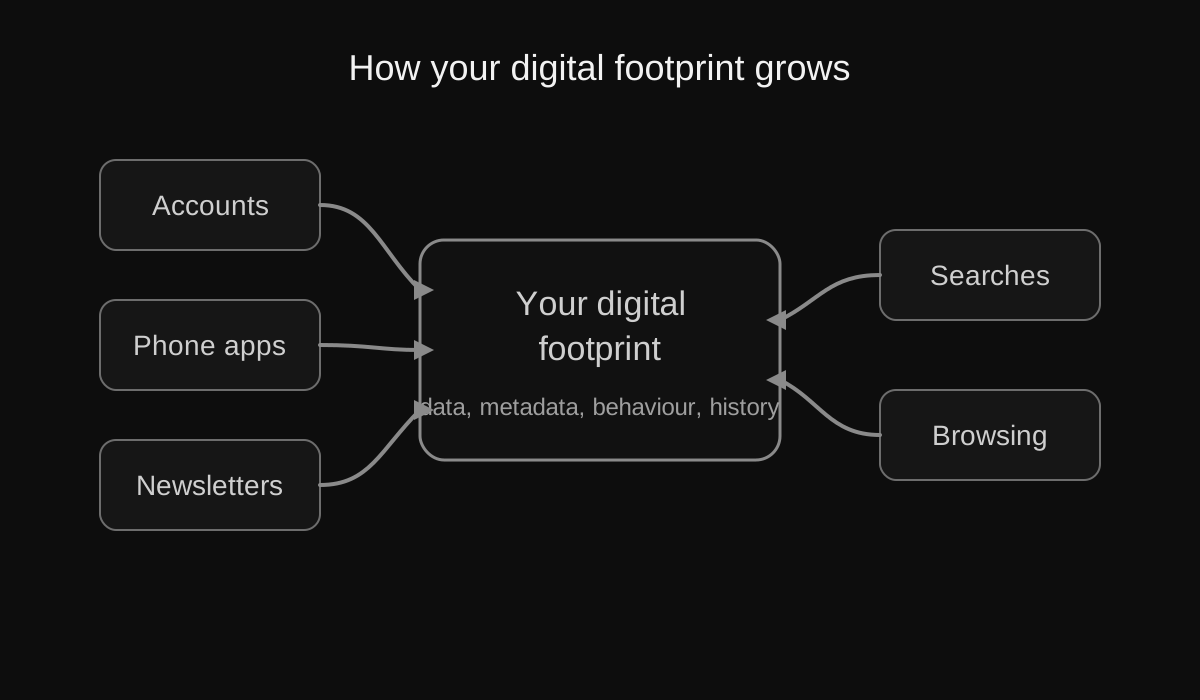
The main idea: your footprint grows across multiple small systems, not just one app or account.
What reducing your digital footprint actually means
It does not mean vanishing.
It means:
- creating fewer unnecessary accounts
- giving apps less access
- using fewer data-hungry services
- reducing how much behavioural data you generate
- making your defaults more private
This is one reason digital minimalism and privacy fit together so well. A smaller digital life is usually easier to secure and harder to profile.
Step 1: list the main places your data lives
Start by mapping the big buckets.
Most people leave data in these categories:
- email providers
- search engines
- browsers
- social media platforms
- shopping sites
- streaming accounts
- cloud storage services
- phones and mobile apps
- old forum or community accounts
- newsletters and mailing lists
The point is not to catalogue every last app immediately. The point is to stop treating your online life as a blur.
Step 2: delete unused accounts
Unused accounts are one of the easiest ways to shrink your footprint.
Every abandoned account can still contain:
- personal details
- old payment methods
- addresses
- order history
- messages
- password recovery paths
- behavioural history
How to do it
- Start with shopping, social, and old app accounts.
- Search your inbox for account creation emails.
- Make a simple list of services you no longer care about.
- Close the account, not just the app.
If you want a broader cleanup framework, use How to Declutter Your Digital Life: Part 1.
Step 3: review which apps actually deserve to stay on your phone
Your phone is often the densest concentration of behavioural data in your life.
Ask of every app:
- do I use this enough to justify keeping it?
- does it encourage compulsive behaviour?
- how much access does it have?
- could I use the browser version instead?
Good candidates for deletion are usually social apps, shopping apps, food delivery apps, duplicate utility apps, and anything that mostly exists to create a habit loop.
Step 4: cut permissions aggressively
Permissions are where convenience becomes exposure.
Review access to:
- location
- contacts
- microphone
- camera
- photos
- Bluetooth
- calendar
Where to find these
- iPhone: Settings > Privacy & Security
- Android: Settings > Privacy > Permission manager or a similar path depending on the phone
A useful rule is this: if the permission does not support the core function of the app, turn it off.
Step 5: reduce tracking in your browser
Your browser sees a huge amount of your digital life, which means browser changes can give you a lot of privacy return for relatively little effort.
A good practical setup is:
- Firefox + uBlock Origin if you want a strong everyday balance
- LibreWolf if you want stricter defaults
This alone will not fix everything, but it changes the baseline.
Step 6: change your search engine
Search behaviour is extremely revealing.
A more private default matters because it affects one of the most repeated actions in daily internet use.
My practical options are:
- DuckDuckGo if you want the easiest switch
- SearXNG if you want an open-source path
- Kagi if you want a paid, privacy-focused premium search experience
You do not have to pick the most ideological option. Pick the one you will actually keep using.
Step 7: move away from a surveillance-heavy email setup over time
Email is not a small switch. It is the backbone of your accounts, recovery paths, and identity online.
If you want one strong recommendation, I would start with Tuta.
Do it in phases:
- create the new mailbox
- test it properly
- move critical accounts one by one
- keep a migration checklist
- avoid deleting the old mailbox too early
I cover the deeper migration process in Best Private Email and Search Alternatives: Part 3.
Step 8: turn off ad personalisation where possible
This will not stop all data collection, but it can reduce how aggressively your behaviour is used to shape ads and profiles.
Check:
- Google ad settings
- iPhone tracking settings
- Android ad settings
- Meta ad preferences
It is not enough on its own, but it is still worth doing.
Step 9: review social login connections
A lot of people have dozens of old services still tied to Google, Apple, or Facebook logins.
Review those connections and remove the ones you do not use anymore.
This reduces the number of services linked to the same identity provider and cuts some of the hidden sprawl.
Step 10: stop treating social media as harmless background noise
Social platforms do not only collect profile data. They collect behavioural data: what you stop on, what you click, what you linger on, what keeps you engaged.
If you want to meaningfully reduce your footprint, the most honest advice is this:
- use less social media
- remove the apps if possible
- keep direct communication channels instead
- avoid replacing one feed with another feed that does the same thing
If you need help with the transition, read How to Quit Social Media Without Feeling Isolated.
Step 11: make privacy maintenance recurring
A smaller footprint stays smaller when you maintain it.
Good recurring checks:
- one unused app deleted every week
- permissions reviewed once a month
- one old account closed every month
- one privacy setting reviewed every Sunday
The point is not obsession. The point is drift prevention.
Step 12: reduce the total amount of digital noise in your life
This is the step many privacy guides miss.
The less noise you generate, the less noise can be captured.
That means:
- fewer apps
- fewer accounts
- fewer default sign-ins
- fewer feeds
- fewer endless browsing sessions
- fewer unnecessary platforms
This is where privacy stops being a settings exercise and becomes a lifestyle pattern.
A realistic order of operations
If you want the shortest practical sequence, do this:
- delete obvious junk apps and accounts
- review permissions on your phone
- switch browser and search defaults
- review social logins
- turn off ad personalisation where possible
- plan an email migration to Tuta
- keep social media off your phone if you can
That is already enough to noticeably shrink your digital footprint.
If you want to go deeper, read What Data Does Google Collect About You?, Best Privacy Tools and Open Source Replacements: Part 2, and Best Private Email and Search Alternatives: Part 3.
Which steps give the biggest privacy return first?
Not every privacy change matters equally.
If you want the biggest return for the least effort, start here:
- delete unused accounts
- review app permissions
- switch browser and search defaults
- get serious about social media use
- migrate away from surveillance-heavy email over time
People often get stuck because they start with low-impact tweaks instead of the larger structural problems.
Common mistakes people make when reducing their digital footprint
Mistake 1: deleting apps but keeping the accounts
The app disappearing from your home screen feels productive, but the real account often remains open and still tied to your data.
Mistake 2: chasing perfect privacy instead of meaningful reduction
If your plan is too extreme, you will likely abandon it. Better to reduce exposure consistently than to fantasise about purity and do nothing.
Mistake 3: switching tools without changing habits
You can move to a more private browser and still generate a huge amount of behavioural data if you keep all the same compulsive patterns.
Mistake 4: ignoring email
Email is one of the most important identity layers in your digital life. A privacy strategy that ignores it is incomplete.
Privacy versus anonymity
These are related, but not the same.
Privacy is about reducing unnecessary access to your data and behaviour.
Anonymity is about reducing the ability to tie actions back to your identity.
Most people do not need full anonymity to make their lives better. They benefit enormously from basic privacy improvements.
FAQ: what people usually ask after the basics
Does deleting old accounts really matter?
Yes. Old accounts hold data, create security risk, and widen your footprint even when you barely remember they exist.
Is incognito mode enough?
No. Incognito mainly affects local browsing history on your device. It does not magically stop websites, networks, or service providers from seeing traffic and behaviour.
Should I switch everything at once?
Usually no. Start with the highest-return changes, then move in stages. A migration you keep is better than a perfect plan you abandon.
What is the single best mindset shift?
Stop asking, “How do I hide every trace?” and start asking, “Why am I creating this trace at all?”
A realistic monthly digital footprint routine
If you want this to last, turn it into maintenance.
Once a week
- unsubscribe from one useless email
- delete one unused app
- review one service you keep out of habit
Once a month
- review phone permissions
- check social logins and connected apps
- close one old account
- review browser and search defaults on all devices
Once every few months
- reassess your email setup
- audit what still deserves your data
- review whether social media is creeping back into your life
A digital footprint usually grows by neglect. It also shrinks by maintenance.