
How to Reduce Screen Time
By KS
If you want to reduce screen time, you do not need a dramatic detox. You need a system that makes compulsive phone use less likely in ordinary life.
That matters because most screen time does not come from one big decision. It comes from dozens of small defaults: a phone in your pocket, badges on the home screen, social apps one tap away, notifications landing all day, and boredom instantly filled by a feed.
This guide goes deeper into how to reduce screen time in a way that actually sticks.
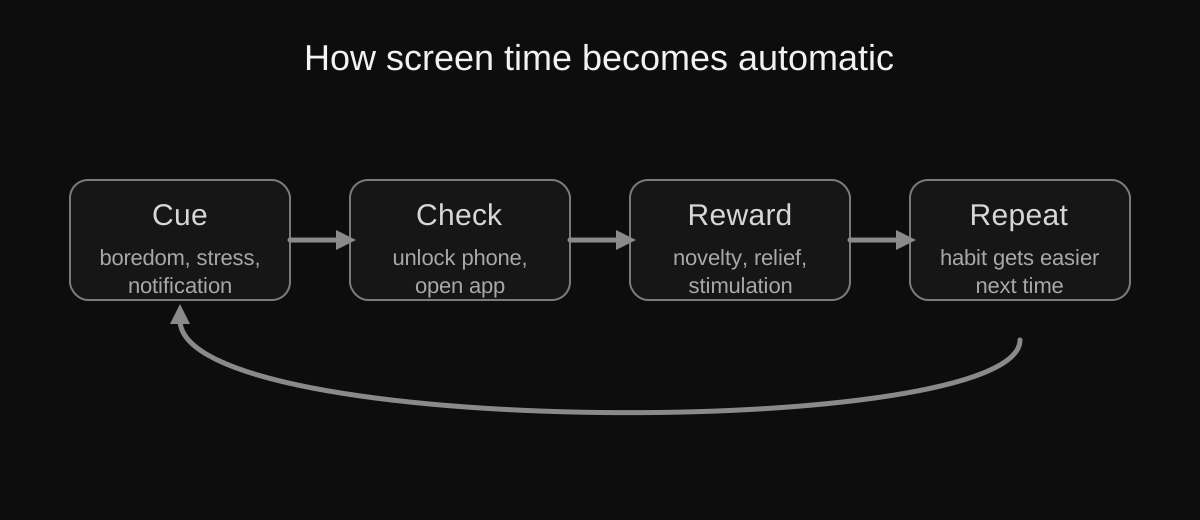
Screen time usually grows through repetition loops, not one big failure of discipline.
Why screen time keeps climbing even when you know better
A lot of advice makes it sound like screen time is just a motivation problem. It is not.
Phones are designed to be fast, vivid, and habit-forming. Many apps use variable rewards, endless refresh, social signals, and interruption loops to keep you returning.
That is why saying “I should use my phone less” rarely changes much by itself.
Step 1: identify where your time is actually going
Do not guess.
Check your screen time dashboard and find:
- your top three apps
- your daily pickups
- your worst time of day
- whether the problem is one app or constant switching
A person whose screen time is mostly YouTube needs a different plan than someone whose phone use is spread across messages, browser tabs, news, and social apps.
Step 2: remove the most addictive apps from the home screen
The home screen should be a tool shelf, not an attention trap.
Keep visible:
- messages
- phone
- maps
- calendar
- notes
- camera
Move everything else away, especially:
- social media
- video apps
- shopping apps
- games
- news apps
This lowers reflexive unlocking.
Step 3: turn off non-human notifications
This is one of the highest-return changes you can make.
Keep notifications for:
- direct messages from real people
- banking and security alerts
- essential delivery or travel updates
- calendar reminders you actually rely on
Turn off the rest.
If a notification mainly exists to get you back into an app, it is not serving you.
Step 4: create friction, not just rules
A lot of people make rules and then wonder why they break them.
Friction works better.
Examples:
- log out of distracting apps after use
- delete the app and keep only the desktop version
- use grayscale if visual stimulation is a trigger
- put the phone in another room during focused work
- make social media available only in one place and one time window
The goal is to interrupt automatic behaviour.
Step 5: protect the two worst windows of the day
For many people, the biggest damage happens:
- right after waking up
- right before sleep
These are fragile attention windows. If they start or end with a feed, the rest of the day often follows badly.
Try protecting them first:
- no phone for the first 30 minutes after waking
- no scrolling in bed
- use a real alarm clock if needed
- charge your phone outside the bedroom if you can
Step 6: create phone-free spaces
Context shapes behaviour.
Good phone-free spaces include:
- the dinner table
- the bedroom
- your desk during deep work
- walks where you do not need navigation
- conversations with other people
It is easier to use your phone less when there are places where it simply does not belong.
Step 7: replace the habit loop
You cannot only remove. You also need replacement behaviours.
Good replacements are boring in the best possible way:
- a paperback
- a notebook
- stretching
- a short walk
- music without a screen
- a low-friction hobby you can start immediately
If you leave a vacuum, the phone usually fills it.
Step 8: treat social media as a special case
A lot of screen time problems are really social media problems wearing a general label.
If that is true for you, say it clearly.
Then make targeted changes:
- remove the app from your phone
- use the desktop version only
- keep direct messaging but remove the feed if possible
- tell important people how to reach you outside the platform
If that sounds hard, read How to Quit Social Media Without Feeling Isolated.
Step 9: reduce digital clutter overall
Screen time gets worse when your device is crowded.
Too many apps, accounts, and alerts create a constant state of low-grade temptation. That is why decluttering matters.
Use How to Declutter Your Digital Life: Part 1 if you want a more systematic cleanup.
Step 10: measure one thing, not everything
Choose one metric:
- total daily screen time
- pickups
- time spent on your worst app
Track it for two weeks.
You do not need a giant dashboard. You need a number that tells you whether your behaviour is moving in the right direction.
Step 11: lower your need for the phone itself
One reason phones dominate life is that they absorb too many functions.
Whenever possible, separate some of those functions:
- use an e-reader for long reading
- use a laptop for deliberate writing or watching
- use paper for quick planning sometimes
- use a real alarm clock
- use a dedicated camera if photography is a serious hobby
The more your phone becomes “everything,” the harder it is to use less.
Step 12: focus on the repeatable version of success
A lot of people fail because they aim for a dramatic version of self-control they cannot maintain.
A better target is this:
- fewer pickups
- fewer compulsive checks
- less bedtime scrolling
- less social media on the phone
- more intentional use overall
That is what a sustainable reduction in screen time actually looks like.
If you want the shorter version, read How to Reduce Screen Time Without Throwing Away Your Phone. If you want the privacy side as well, read How to Reduce Your Digital Footprint Step by Step.
What if your job already requires a lot of screens?
This is a real problem, because not all screen time is equal.
If your work depends on a computer or phone, the goal is not “use screens less” in a vague total sense. The goal is to reduce recreational compulsion on top of necessary work use.
That usually means:
- making your phone less rewarding outside work
- protecting mornings, evenings, and breaks from mindless scrolling
- separating work devices from entertainment when possible
- keeping leisure time from being swallowed by the same habits that dominate work hours
What if evenings are the hardest part?
For many people, the screen time battle is really an evening battle.
That is when energy is lower, willpower is worse, and boredom feels sharper.
If evenings are your weak spot, try building a specific low-friction replacement routine:
- charger outside the bedroom
- one book or e-reader ready
- a set time when social apps stop being available
- a simple offline activity that does not require motivation to start
The less decision-making required at night, the better.
FAQ: common screen time questions
Should I delete social media completely?
If social media is your main source of compulsive use, deleting the apps entirely is often more effective than hoping for moderation. If that feels too extreme, move the platforms to desktop-only use first.
How long does it take to feel different?
Often a few days are enough to notice less reflexive checking, but deeper habit changes usually take longer. The key is not a perfect reset. It is a setup you can maintain.
Is all screen time bad?
No. The real issue is not every minute spent on a screen. The issue is when screen use becomes compulsive, fragmented, sleep-damaging, or so automatic that it starts replacing the rest of life.
A simple 7-day screen time reset
If you want a concrete experiment instead of vague self-improvement, try this for one week:
Day 1
- check your screen time dashboard
- identify your top three apps
- remove the worst one from the home screen
Day 2
- turn off non-human notifications
- keep only direct communication and essential alerts
Day 3
- make your bedroom phone-free
- use a charger outside the bed area
Day 4
- create one phone-free block in the day
- even 30 minutes is enough to start
Day 5
- delete or log out of one highly compulsive app
Day 6
- go for one walk without your phone if practical
Day 7
- compare your pickups, mood, and sleep with the week before
This is not a miracle plan. It is a practical reset that shows you what actually changes your behaviour.